-
Type:
Bug
-
Resolution: Unresolved
-
Priority:
 Normal
-
None
-
Affects Version/s: None
-
Component/s: Release editor
-
None
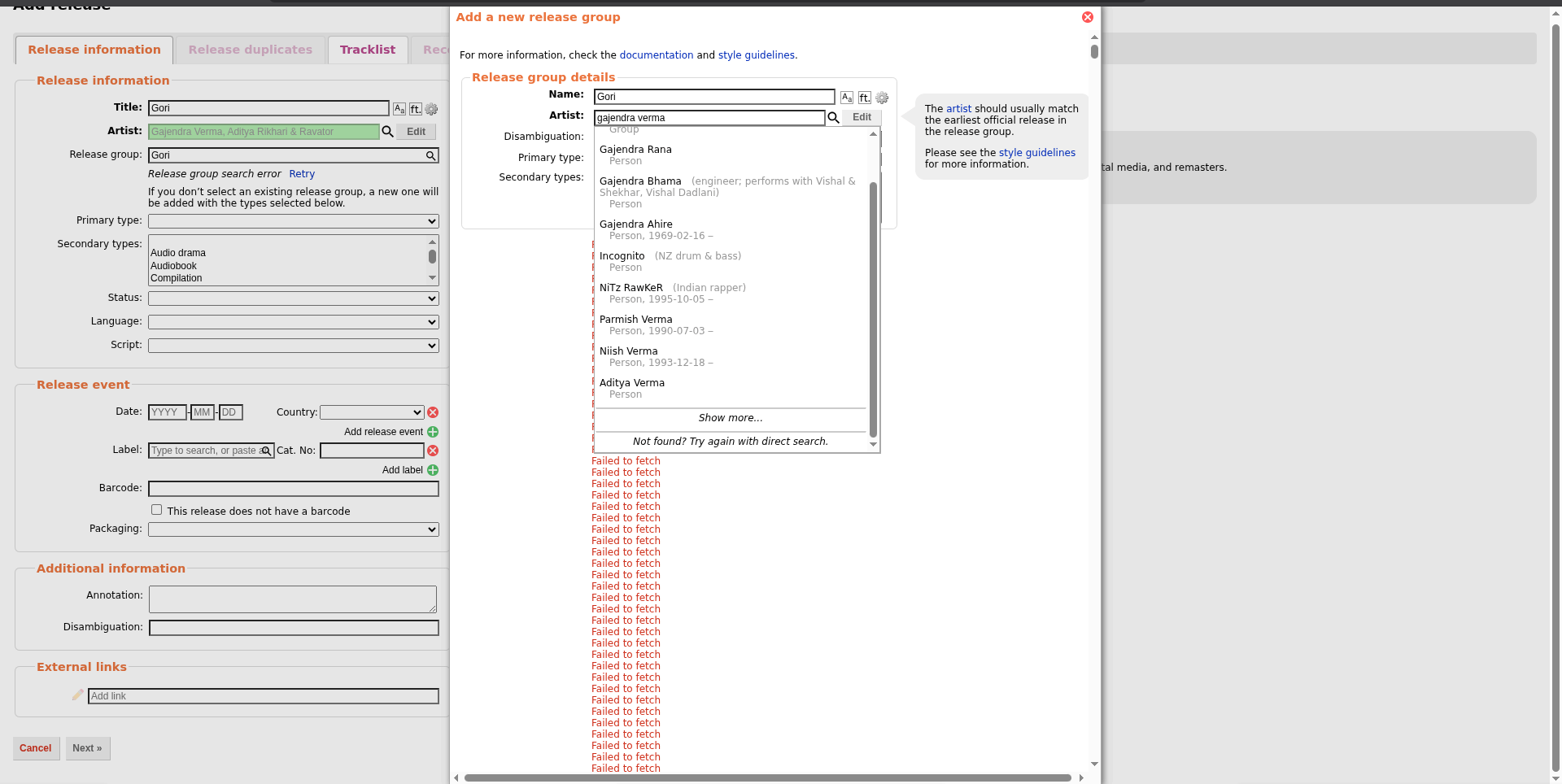
While editing a release (Add/Edit release page), the site continuously fetches data such as artist relationships and suggestions.
If the network changes mid-session (e.g., connecting to a VPN), the ongoing fetch requests fail and start returning "Failed to fetch" errors.
Instead of stopping or recovering, the UI enters an infinite loop where "Failed to fetch" is repeatedly printed on the screen, making the page unusable.
Steps:
1. Open MusicBrainz release editing page (add/edit release)
2. Start typing/selecting artist (triggers async fetch)
3. While it is fetching, connect/disconnect VPN (network change)
4. Observe error messages
Expected Result:
- Failed requests should stop retrying infinitely
- UI should recover or show a single error message
- Option to retry manually
Actual result :
- Infinite "Failed to fetch" messages appear
- UI keeps retrying without stopping
- Page becomes cluttered/unusable
ENV:
Browser: Brave (Chromium-based)
OS: Cachy os
Network: VPN switch during request(proton vpn)