-
Type:
New Feature
-
Resolution: Duplicate
-
Priority:
 Normal
-
None
-
Affects Version/s: None
-
Component/s: User Interface
-
None
-
Environment:All versions
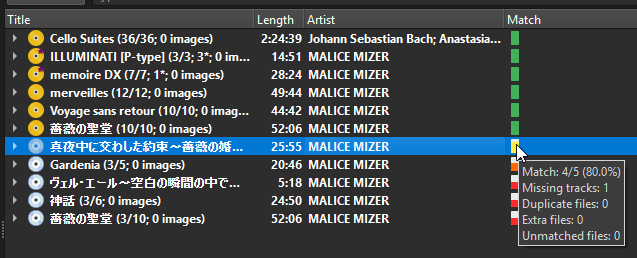
In Picard's right-hand pane, releases that are fully matched (all tracks matched to files) display as a gold disc icon, while incomplete or partially matched releases appear as silver discs.
It would be helpful to have a filter, view toggle, or sorting option that shows only the gold disc releases, i.e., those that are fully matched.
This would greatly improve batch tagging workflows by making it easier to:
- Identify albums ready for saving/tagging
- Avoid manually scrolling through unmatched or incomplete releases
- Export or process only fully matched data
Since the icon logic already exists, the internal match status could be exposed as a filter or UI toggle (e.g. “Show only matched releases”).
This could be implemented as:
- A checkbox or toggle above the right pane
- A sort mode (e.g., “Sort by match status”)
- Or a right-click filter option
Use Case Example:
A user loads hundreds of albums into Picard, but only wants to save metadata for those that are fully matched. Currently, they must visually inspect and scroll through the list to find gold disc icons. A filter would make this much faster and more efficient.
- duplicates
-
PICARD-442 Allow sorting by whether release is complete
-
- Review Submitted
-