-
Type:
Bug
-
Resolution: Invalid
-
Priority:
 Normal
-
None
-
Affects Version/s: 3.0.0a3
-
Component/s: Packaging & Deployment
-
None
-
Environment:Fedora 44
Version: 3.0.0
Platform: Fedora 44 x86_64
Qt: PyQt6 (system package)
Desktop: (KDE)
Display scaling: (100%)
Description:
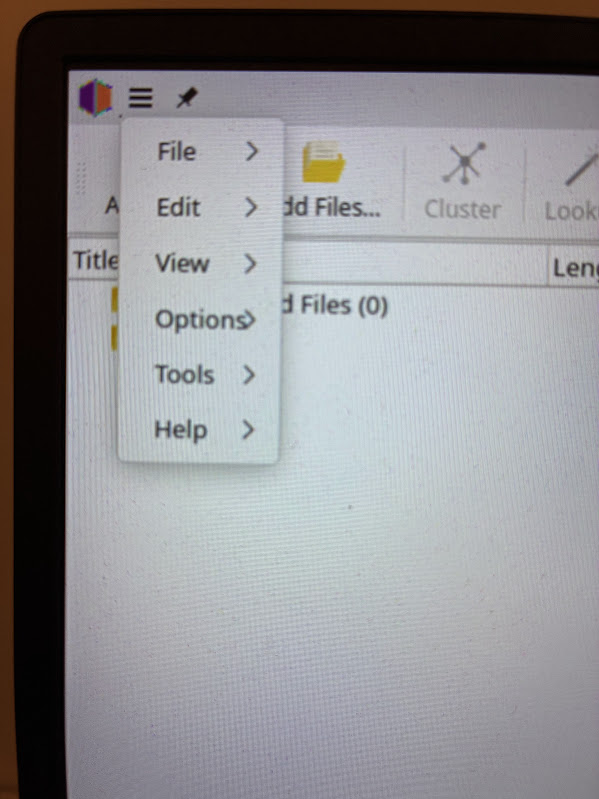
In the main application menu, the submenu indicator arrow (>) overlaps the text of the "Options" menu entry.
The arrow is drawn too close to the label and partially covers the final character.
See attached screenshot.
Expected behavior:
Menu text should not be overlapped by the submenu arrow indicator.
Actual behavior:
The submenu arrow is rendered on top of the label text.
Steps to reproduce:
- Launch Picard
- Click the application menu (hamburger menu)
- Observe the "Options" entry
Additional notes:
- Reproducible on Fedora system build
- Using system Qt6/PyQt6
- No custom theme