-
Type:
Improvement
-
Resolution: Unresolved
-
Priority:
 Normal
-
None
-
Affects Version/s: 3.0.0a4
-
Component/s: Tags & Metadata
-
None
-
Environment:Mac OSX Tahoe 26.3.1 (a) (25D771280a)
Similar to the edit tag function, but executes a string replace instead of overwriting the existing value. To be used on multiple files.
Scenario: You have a number of files where one tag, for example the title, is "Artist - Song 1", "Artist - Song 2".. etc.
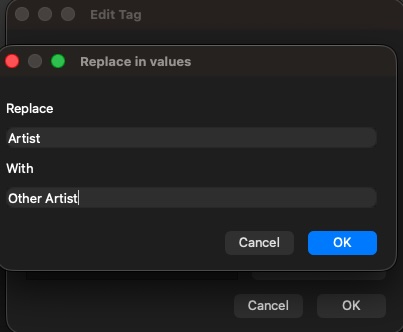
You invoke the function and are asked for the string to replace and the replacement. You select "Artist" to be replaced with "Other artist" (or empty).
Result: The title is appropriately changed on each file: "Other artist - Song 1", "Other artist - Song 2"
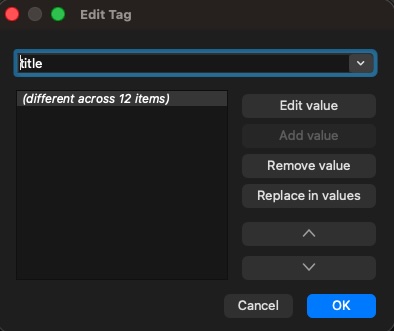
Where: On the Edit tag dialog. A button under "Remove value" with caption "Replace in values".
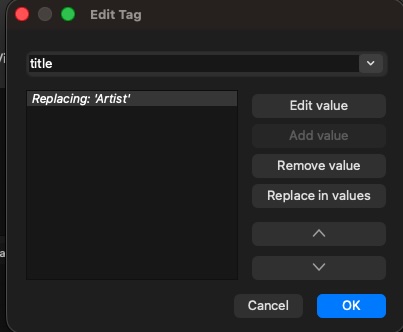
Behaviour: When the new button is clicked a dialog opens up where the user can fill two text boxes labelled "Replace" and "With". Once the user clicks ok, the tag value changes to "Replacing '(string)'". Changes are applied to the files when the user clicks OK on the Edit Tag Dialog.
Button is disabled if only one file is selected.
Other notes:
Inspired by MacOSX's multiple file rename function.
I already have an initial implementation on my fork: https://github.com/imagremlin/picard